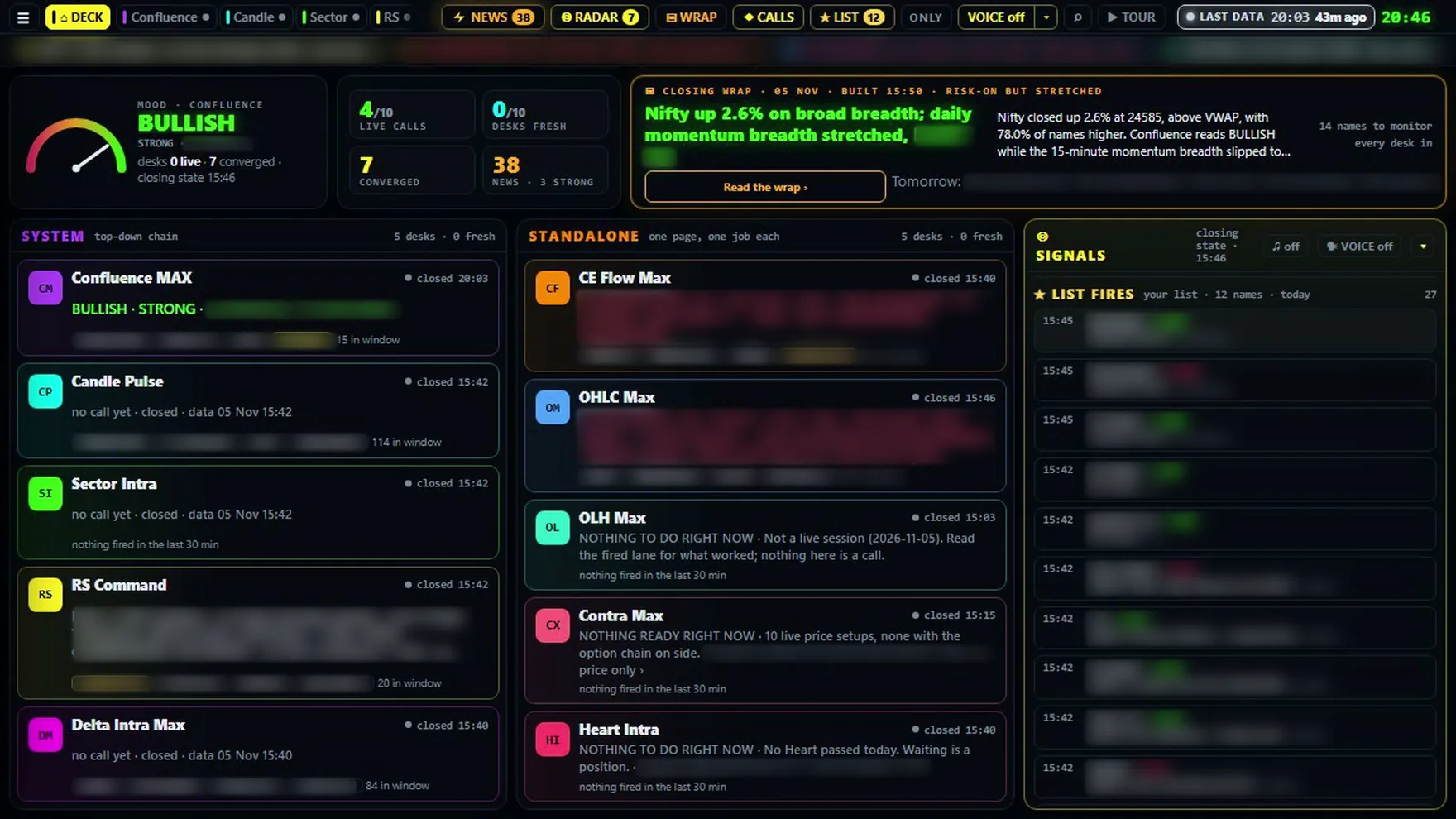
A command deck for the Indian F&O market, updated through the session. It reads the market through ten dashboards and shows signals on both the buy side and the sell side. The decision stays with you.
Real screens from after the close on 5 November 2026, with stock names and stock prices hidden. The alert pop-ups are examples.
Scroll
10desks under one command deck
200+F&O stocks covered
5 & 15minute clocks read together on CE Flow Max
2alert voices, male and female
3looks on seven desks: Neon, Light, Pro Desk
The command deck
You don't begin with ten dashboards. You begin here.
One screen tells you which way the day leans, which names the desks have fired, and how old each desk's data is. Step through it.
The ten desks
Ten desks. Each one answers a question.
Five system desks read the market from the top down. Five standalone desks each do one job. Pick a desk.
How it behaves
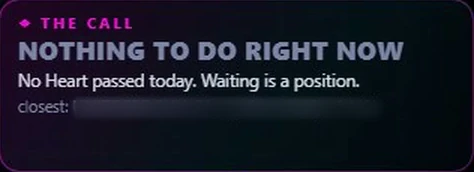
It also tells you when to do nothing.
Heart Intra on 5 November, in its own words.
If a desk stops, it says so.
Each desk carries its own time stamp, and the hub grades freshness from that stamp, not from when the page was drawn. If a desk stops updating, it says so and shows when it last updated.
Signals on both sides.
Signals on the buy side and the sell side. Whether you act on one depends on your own analysis and your risk appetite.
The risk is on the trade cards.
Where a desk gives a trade setup, the card shows the stop. Several desks also size it to a fixed risk limit, and the card says so if one lot is too big.
No profit figures on this page.
We won't promise you a return. You can judge the desks yourself during the trial.
Built for a working day
It keeps up when you step away.
Hear it when something fires.
Turn voice on, click once on the page, and keep the hub open on your laptop while you get on with your work. System desks speak in a male voice, standalone desks in a female voice, and a small pop-up shows the alert.
The desk's name, or the desk and the stock with bullish or bearish
All ten desks from one switch, or only the ones you pick
An alert tells you that something has fired. It can come a little after the desk updates, and up to ten minutes later for Confluence Max and RS Command when their page is in the background. The decision stays with you.
Find your stock.
Type a name and get one card with what each desk has fired on that stock today: what fired recently, what fired earlier, any desk call that names it, and any news on it.
Press the keys to try it. On this page it finds desks. On the hub it finds your stock.
Alt+O
Your list, on every desk.
Save your own list and your names are marked on every desk. Press Only, and the stock cards and rows narrow to your names, though a desk's own counters still count everything. When a desk fires a name on your list, a pop-up tells you. List Fires logs the day while the hub is open in your browser: which name, which desk, and when.
Build your own scan.
Add a condition, like price above the previous day's high. You get the count and every stock that passes. Keep adding conditions on spot or futures, then save it under your own name. It runs again each time the board updates while the page is open: about every minute in the first fifteen minutes, and usually every few minutes after that. Saved filters stay in that browser.
Alt+Z
Closing Wrap: your homework for the next morning.
After the close, one reading of the day: what the market did, how stretched it is, which sectors led, and the names to monitor tomorrow. It is built from each desk's own closing numbers and from stories that came out after the close. AI writes the sentences from those numbers. Each section is checked for names that are not in the data; if it fails, a fixed template writes that section instead.
Three looks. Try them here.
Seven desks carry these three looks. Candle Pulse, Sector Intra and RS Command have a dark look and a light mode, and one switch sets light or dark across the hub. Pick one and this page changes with it.
News in one line.
Each story is one line, tagged bullish, bearish or neutral, on the names in the desk's shared watchlist. AI does the tagging, and a keyword rule takes over if AI is unavailable. Click the headline for the story, or the name for its chart.
Laptop and phone.
All ten desks and the command deck work on both. The stock finder, list controls and keyboard shortcuts are on the laptop. New users are offered a guided tour at first sign-in.
The smaller things a trader notices.
When desks agree on a name, the Signals panel also shows any desk that fired the other way.
Signals also lists sectors where several desks agree, not only single stocks.
A desk that has stopped updating is left out of the Signals count, and the panel names it.
When a desk's call changes, its row shows NEW until you open it.
Candle Pulse and CE Flow Max cards show when the desk first saw a signal, so you can see how late you are.
Confluence Max, OLH Max, Contra Max and Heart Intra work out how many lots fit inside the fixed risk limit.
Before the open, a brief shows pre-open breadth, the index gaps, and the sectors and stocks that stand out.
A day on the desk
Watch. Choose. Manage. Prepare.
Read the brief
A pre-open brief arrives at about 09:13 and opens by itself.
Watch
For the first fifteen minutes, you watch.
Choose
You look at the calls where the desks agree.
Manage
Mostly you manage what you already have. The desks keep firing through the day, and the routine asks for more agreement before anything new.
Prepare
The Closing Wrap helps you prepare for the next day.
See it working
Every desk, in under 15 minutes.
A full walkthrough in plain English: one person asks, the other answers. It is a good way to see whether the desk suits how you trade.
Recorded on 5 November 2026. The conversation is scripted and the two voices are computer-generated. It shows real screens from that day, including stock names, only to explain how the desk works. Where the film and this page differ, this page is the current description. Open on YouTube
AIPROPLUS
One product today. More on the way.
Available now
Saahil's Desk
Ten dashboards for the Indian F&O market, updated through the session, on your laptop and your phone.
Stock finder, My List, custom filters and Closing Wrap
All ten desks on your laptop and your phone; finder and list controls on the laptop
After the trial: contact us for pricing.
Questions
Before you sign up.
What is Saahil's Desk?
A set of ten dashboards for the Indian F&O market, all opened from one command deck. It is the first product from AIPROPLUS.
Who makes the decision?
You do. The desk shows signals on both the buy side and the sell side. Whether you act on one depends on your own analysis and your risk appetite.
How long is the free trial?
It runs until 30 November 2026, with all ten desks included.
What does it cost after the trial?
Contact us and we will talk you through it.
How fresh is the data?
Each desk has its own rhythm. Candle Pulse puts a 15-minute signal on the board usually in under a minute, and its other timeframes within minutes. Heart Intra updates every few minutes, Delta works on each 15-minute candle, and Contra Max follows each hourly close by a few minutes. Every desk shows its last update time, and says so if it stops.
Does it work on a phone? How many devices can I use?
The desks work on a laptop and a phone. You can use up to three devices together on the same Wi-Fi; a phone on mobile data counts as another connection and can sign the others out. VPNs are not allowed.
Will I get alerts on my phone?
Voice alerts and pop-ups work while the hub is open in your browser. A phone browser may pause a page in the background, so keep it on screen. Phone alerts are available on request.
Can I see how the signals are worked out?
You see the signal and its tags, and the guide explains how to read them, but the full rules are not shared.